Meet the Ultimate
Features
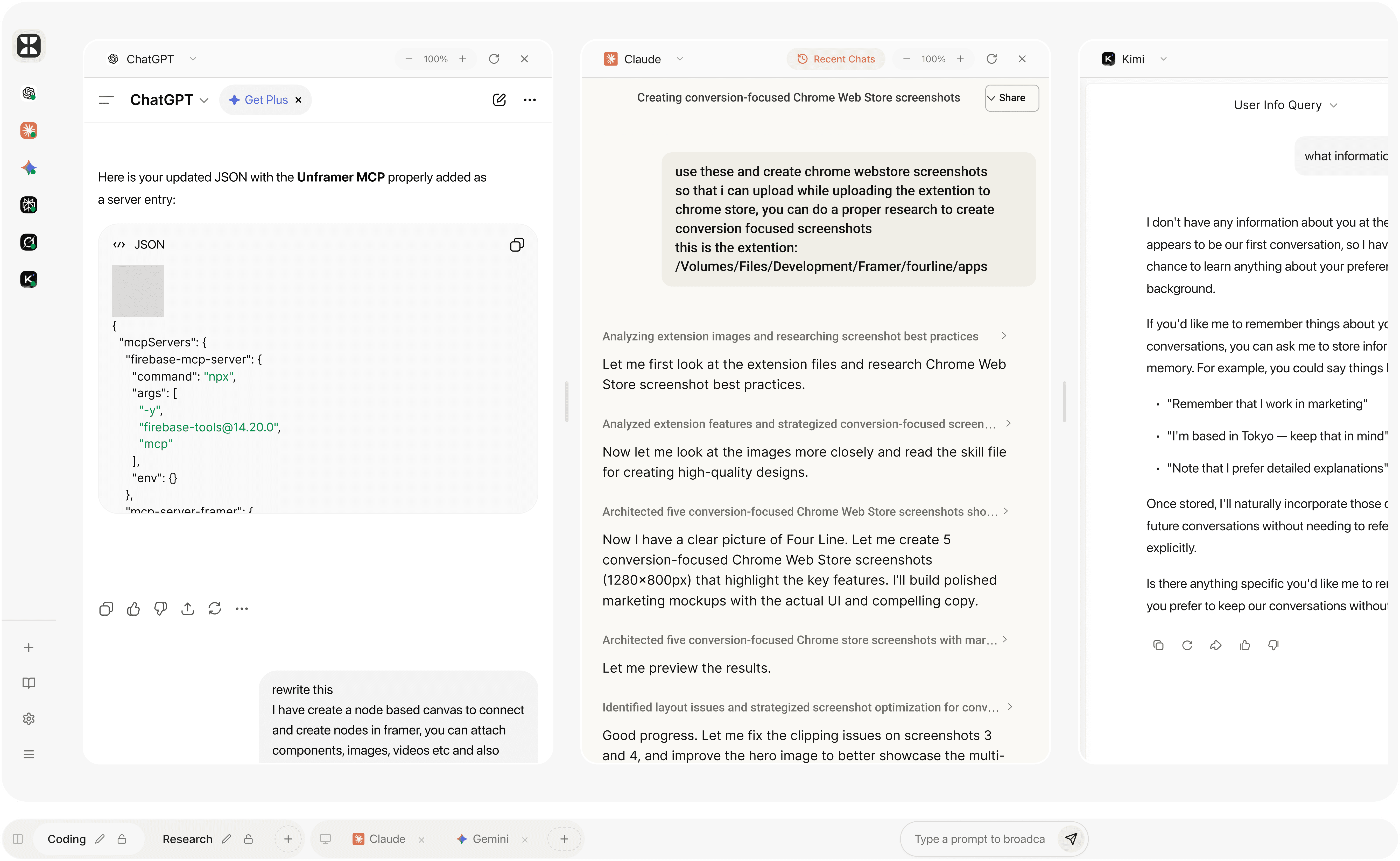
A single workspace. Countless combinations.
Fourline is built to handle however you decide to work. Single focus mode, broad comparison grids, or rapid-fire broadcast—you aren’t locked into one tool.

×

×

×
Tab Management
Add any URL as a tab. Drag and drop to reorder. Fourline instantly fetches the title and favicon. Per-tab zoom controls save automatically, and live URL tracking ensures that you never lose your spot in a long session.
View Modes & Layout
Single-pane mode for focus, or split view to show 2+ tabs simultaneously. Resizable dividers let you tune the space. Completely keyboard-first: hit Cmd+1-9 to jump to tabs or Cmd+\ to toggle the sidebar.

Claude
Analyzing extension images and researching screenshot best practices
Let me first look at the extension files and research Chrome Web
Store screenshot best practices.
Analyzed extension features and strategized conversion-focused screen
Now let me look at the images more closely and read the skill file
for creating high-quality designs.
Architected five conversion-focused Chrome Web Store screenshots sho
Now I have a clear picture of Four Line. Let me create 5 conversion-focused Chrome Web Store screenshots (1280x800px) that highlight the key features. I'll build polished marketing mockups with the actual UI and compelling copy.
Architected five conversion-focused Chrome store screenshots with mar
Let me preview the results.
Identified layout issues and strategized screenshot optimization for conv
Good progress. Let me fix the clipping issues on screenshots 3
and 4, and improve the hero image to better showcase the multi-
AI feature.
ChatGPT
Here is your updated JSON with the Unframer MCP properly added as a server entry:
JSON
{
“workspace”: “shared”,
“group”: “AI Chat”,
“panes”: 3,
“sync”: true
}
Reply...
Opus 4.6
Extended
Claude is AI and can make mistakes. Please double-check responses.
Ask away. Pics work too.
K2.5 Instant
Type a prompt to broadcast...
Multi-AI Broadcast
The flagship feature. Fire your prompt into the group bar and it sends to every visible pane simultaneously. Service-aware injection knows where the input fields are, so you hit enter once and watch five models reply immediately.
One Core, Three Apps
Extension replaces your new tab page bypassing framebusters. Desktop (Electron) uses true WebContentsView for unrestricted browsing. Web App runs anywhere with zero install. State is synced and format-agnostic.
Available Everywhere
Choose your surface.
Use it in your browser today.
Go native with desktop and mobile apps launching soon.
Run your whole stack in one view.
Built to be your primary AI workspace. Fourline auto-fetches previews, saves per-tab zoom levels, and live-tracks URLs so you never lose your spot in a long session.
Add any website as a tab.
Pre-configured AI services built in.
Drag-and-drop tab reordering.
Inline rename and per-tab zoom controls.
ChatGPT
Claude
Chrome Extension
Native Desktop
Mobile App
Fourline runs where you need it. A new-tab extension bypassing framebusters. A native Electron desktop app. A zero-install web app. All sharing the same state.
Extension (Chrome MV3) with anti-framebusting.
Desktop (Electron) running native WebContentsViews.
Mobile app with native mobile browsing and the same workspace model.
Save everything.
Group tabs into defined workspaces. Save reusable prompts and notes to a dedicated library. Import or export your entire JSON state on demand.
Organize tabs into named, lockable groups.
Group-isolated view modes and pane layouts.
Save prompts & notes via right-click or toolbar.
One-click full workspace JSON Import / Export.
Reply...
Opus 4.6
Extended
Claude is AI and can make mistakes. Please double-check responses.
Ask away. Pics work too.
K2.5 Instant
Type a prompt to broadcast...
Type once. Send everywhere.
The flagship feature. Fire your prompt from the group bar and it sends to every visible pane simultaneously. Service-aware injection handles the exact DOM targets automatically.
Injects via `postMessage`, IPC, or Content Script.
Service-aware injection (knows ChatGPT vs Claude).
Slash-command (`/`) prompt library integration.
Configurable auto-submit per AI service.
Made for Teams
made for teams that think in parallel
Built for people who use AI seriously: developers debugging code, researchers cross-referencing sources, and creators iterating on ideas.
for developers
Compare code generation side-by-side. Validate logic across models and ship with confidence.
for researchers
Cross-reference answers from multiple AI models in real-time. Spot inconsistencies before they cost you.
Writers
Develop tone, structure, and alternate angles at once, then keep the strongest thread in view as the draft sharpens.
Shared context
Keep prompts, notes, and decisions visible while the workspace keeps moving.
Model spread
See where answers align, where they drift, and where deeper review is worth it.
Saved state
Return to the exact workspace you left, from panes and notes to saved prompts.
Four Line memory
Your workspace
keeps the thread.
comparison signals
alignment map
confidence ladder
decision certainty
Release path
Roadmap
A clear view of what’s live now and what’s shipping next.
Live
Chrome Extension v1.0
In progress
Desktop App for macOS & Windows
Coming soon
Mobile App for iOS & Android